01
Edit behaviors as nodes
Each generated behavior appears as a node on the desktop and as a panel in VR. Change its objects and parameters by hand instead of prompting again.
Live, Transparent Authoring of Immersive Scenes in VR and on the Desktop
1VNU University of Engineering and Technology, Hanoi, Vietnam 2German Research Center for Artificial Intelligence (DFKI) 3University of Oldenburg, Oldenburg, Germany 4Osnabrück University, Osnabrück, Germany 5Korea Advanced Institute of Science & Technology (KAIST), Daejeon, Republic of Korea *Equal contribution
Paper under review
Agents built on large language models (LLMs) can build interactive 3D scenes from a request, so the user's work shifts from writing code to checking and correcting it. However, a user who does not read the code can often only correct the agents by asking again and waiting for the agents once more.
We demonstrate SetPiece, a desktop and virtual reality (VR) authoring system that shows the agents' work in two editable forms. Before objects are generated, the agents propose a layout plan of labeled 3D boxes that the user can move, rotate, scale, and select. Once a behavior is generated, it appears as a node (in VR, as a panel) whose objects and parameters the user can edit by hand. Generated code is loaded at runtime, so edits take effect without restarting the application, and failing code is rolled back.
SetPiece also includes built-in tasks with automatic checks to compare agent pipeline configurations. Planned user studies will examine when users fix errors by hand and when they still need agents or code, thereby assessing whether editable intermediate representations allow people without game-engine experience to steer coding agents.
Pick a scene, then change a number or reconnect a node in the graph and watch the behavior change live.
The interactive demos need a computer with a mouse and keyboard. Open this page on a desktop browser to try them.
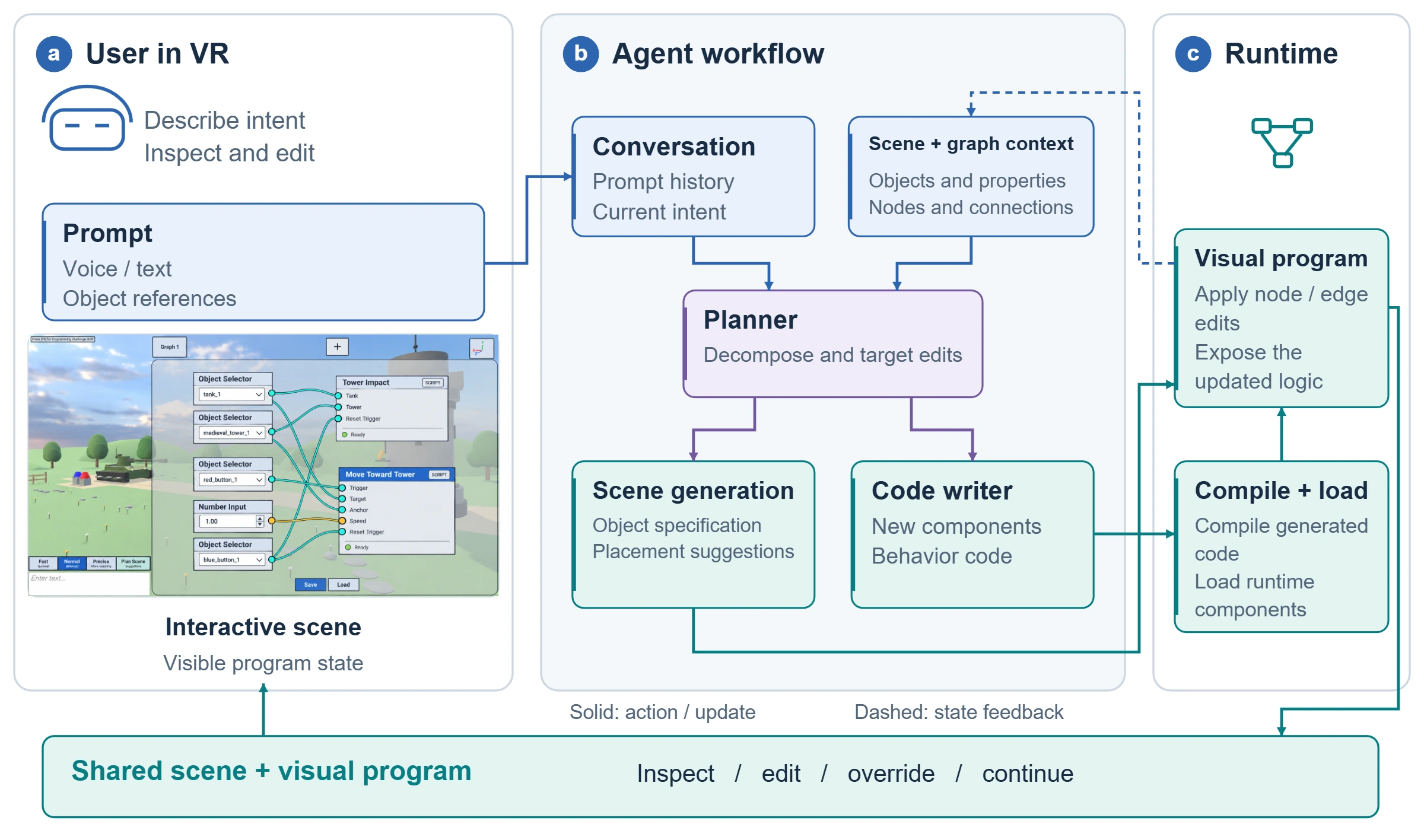
Each generated behavior appears as a node on the desktop and as a panel in VR. Change its objects and parameters by hand instead of prompting again.
Generated code is loaded at runtime, so edits take effect without restarting the application. If new code fails, it is rolled back.
In Plan Scene mode, the agents suggest objects to add to the scene. Each selected suggestion appears in place as a labeled box that you can move, rotate, and scale before anything is built. Applying the plan builds the selected objects together.
In the desktop user ablation study, configuration A scored 8 or more on all 14 problems, with the fewest user prompts (1.63) and the least recorded time (283.6 s).
| Score by problem (0–10) | P1Build from scratch | P2Build from scratch | P3Creative scene | P4Build from scratch | P5Creative scene | P6Creative scene | P7Logic completion | P8Logic completion | P9Logic completion | P10Debug and repair | P11Debug and repair | P12Debug and repair | P13Debug and repair | P14Debug and repair |
|---|---|---|---|---|---|---|---|---|---|---|---|---|---|---|
| AOurs 5.6 | 10 | 10 | 8.9 | 10 | 9.75 | 9.4 | 10 | 10 | 10 | 10 | 10 | 10 | 10 | 10 |
| BOurs 5.6, no scene planning | 10 | 10 | 7.1 | 10 | 8.5 | 6.2 | 10 | 10 | 10 | 10 | 10 | 10 | 10 | 10 |
| COurs 4o | 10 | 3.33 | 8.42 | 6.7 | 6.2 | 8.25 | 10 | 10 | 0 | 10 | 3.33 | 10 | 8.33 | 5.83 |
| DGenAssist 5.6 | 3.84 | 10 | 7.75 | 8.35 | 3.9 | 6.5 | 10 | 2 | 10 | 5 | 2 | 10 | 10 | 8.33 |
| EOurs without visual scripting | 10 | 10 | 8.8 | 10 | 9.54 | 9.04 | 10 | 10 | 10 | 10 | 10 | 10 | 10 | 7.78 |
@misc{setpiece2026,
  title  = {Co-Authoring with Agents: Live, Transparent Authoring of Immersive Scenes in VR and on the Desktop},
  author = {Nguyen, Phong and Pham, Duc and {Tran Anh}, Tuan and {Abu Ahmad}, Muhammad and
            Ahmed, Arham and Nguyen, Hiep and Ho, Phuong and Kop{\'a}csi, L{\'a}szl{\'o} and
            Sonntag, Daniel},
  year   = {2026},
  note   = {Under review}
}
The full citation will be added when the paper is published.